> ## Documentation Index
> Fetch the complete documentation index at: https://guide.mylifenote.ai/llms.txt
> Use this file to discover all available pages before exploring further.
# Wisdom Collection
> Highlight and curate your wisdom library
 ## Collecting wisdom
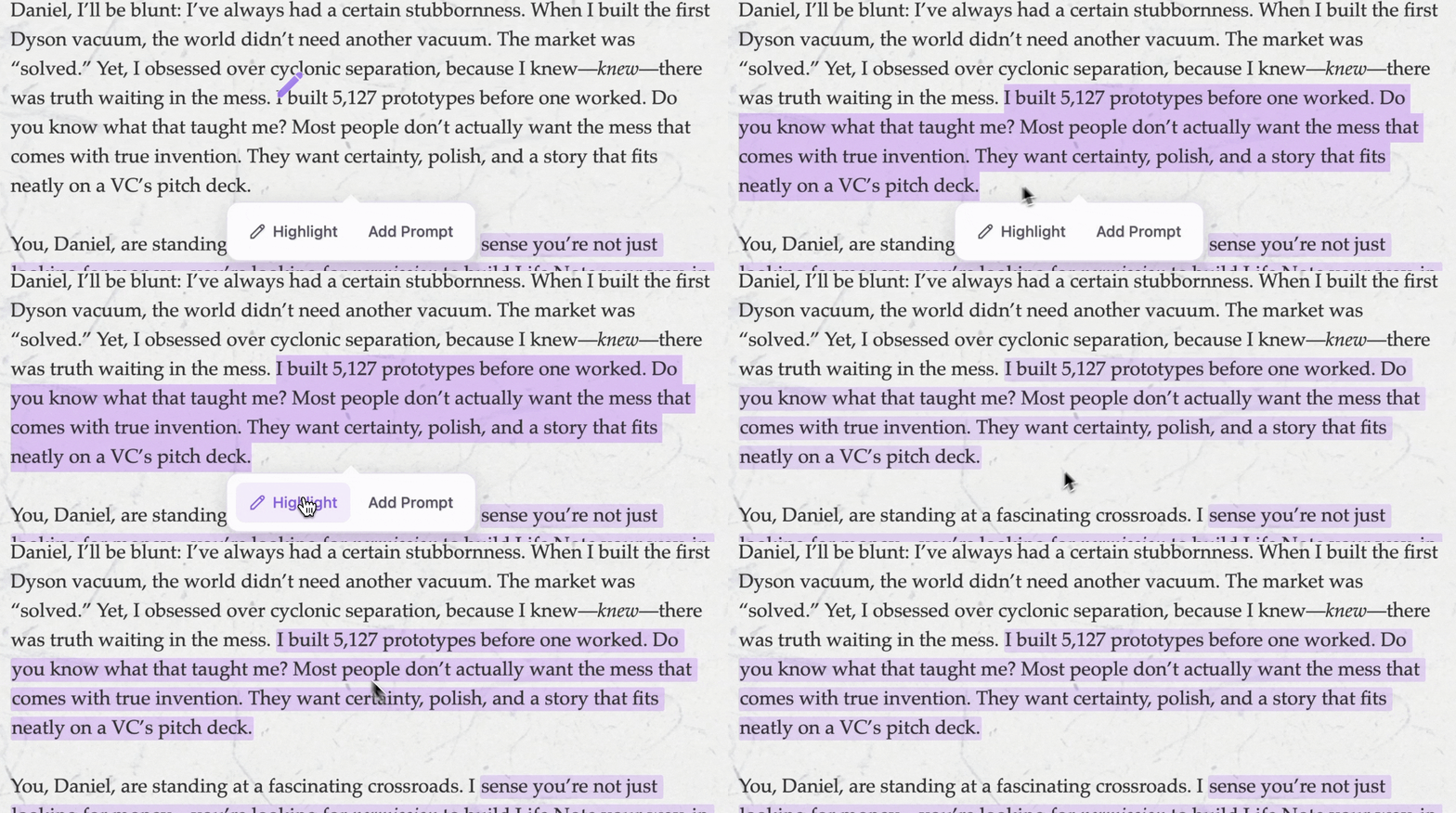 When a mentor’s words touch something deep, you can now **save them in your wisdom collection** for your future reflection.
Your Wisdom Collection is where these moments live—saved, searchable, and shareable. Over time, it becomes a curated library of the ideas that shaped your thinking.
**Where to find it:**
* **To save:** In any mentor response, select text → Tap **"Save to Wisdom"**
* **To browse:** Home → **"Wisdom Collection"** section → **"See All"**
When a mentor's words resonate:
1. **Long-press** (on mobile) or **click and drag** (on desktop) to select the text
2. A menu appears—tap **"Highlight"**
3. The passage is added to your collection and will appear highlighted when you revisit the mentor responses
You can save from journal responses, Deep Chat conversations, or Weekly Letters.
***
## Wisdom Cards
When a mentor’s words touch something deep, you can now **save them in your wisdom collection** for your future reflection.
Your Wisdom Collection is where these moments live—saved, searchable, and shareable. Over time, it becomes a curated library of the ideas that shaped your thinking.
**Where to find it:**
* **To save:** In any mentor response, select text → Tap **"Save to Wisdom"**
* **To browse:** Home → **"Wisdom Collection"** section → **"See All"**
When a mentor's words resonate:
1. **Long-press** (on mobile) or **click and drag** (on desktop) to select the text
2. A menu appears—tap **"Highlight"**
3. The passage is added to your collection and will appear highlighted when you revisit the mentor responses
You can save from journal responses, Deep Chat conversations, or Weekly Letters.
***
## Wisdom Cards
 You can transform your collected wisdom into a wisdom card and share it with people
To create a Wisdom Card:
1. Open your Wisdom Collection
2. Tap any saved insight
3. Select **"Create Card"**
4. Choose a design style
5. Save to photos or share directly
These aren't generic quote images. They're *your* insights, from *your* conversations, rendered beautifully.
## Browsing your collection
Your Wisdom Collection grows with you.
Open it to see every insight you've saved, organized, and accessible. You can:
* **Search** for specific words or themes
* **Filter by mentor**—see all wisdom from Marcus Aurelius, or only Maya Angelou's insights
* **Scroll through time**—watch how the ideas that move you have evolved
Some users browse their collection in the morning, like a daily devotional. Others revisit it when facing familiar challenges. There's no right way to use it.
You can transform your collected wisdom into a wisdom card and share it with people
To create a Wisdom Card:
1. Open your Wisdom Collection
2. Tap any saved insight
3. Select **"Create Card"**
4. Choose a design style
5. Save to photos or share directly
These aren't generic quote images. They're *your* insights, from *your* conversations, rendered beautifully.
## Browsing your collection
Your Wisdom Collection grows with you.
Open it to see every insight you've saved, organized, and accessible. You can:
* **Search** for specific words or themes
* **Filter by mentor**—see all wisdom from Marcus Aurelius, or only Maya Angelou's insights
* **Scroll through time**—watch how the ideas that move you have evolved
Some users browse their collection in the morning, like a daily devotional. Others revisit it when facing familiar challenges. There's no right way to use it.